Use this free project premortem template before approving a launch, pilot, or rollout. Imagine the project has already failed. What could have caused it, what evidence could you collect before approval, and which finding would change your decision?
Download the Excel template (.xlsx)
The workbook includes a Blank template and a Completed example with matching fields. You can also copy the worksheet below or read the completed launch example.

Copyable project premortem template
Copy the text into your project notes. Complete the decision section once, duplicate the concern record for each cause worth investigating, and fill in the decision record at the review. In Excel, the blank tab has space for three concerns.
DECISION UNDER REVIEW
Project:
Decision and date:
Intended outcome:
Imagined failure:
Decision owner:

CONCERN RECORD — repeat as needed
Possible cause:
Early warning sign:
Evidence to check:
Action owner:
Review date:
Decision trigger and response:
Evidence observed:

DECISION RECORD
Decision taken and reason:
Follow-up and owner:
Write the trigger before you see the result. “Check whether customers can sign in” describes a test. “If a legacy customer cannot sign in, keep their existing support channel open” tells the sponsor how to use the result. Enter what actually happened under Evidence observed after the test.
Completed premortem example for a customer portal launch
In this illustrative example, the launch sponsor must decide whether to move all customers to a new support portal on Friday, December 4. Success means customers can submit requests and urgent tickets reach priority support. The team imagines it is one week after launch and urgent requests are going unanswered. Three explanations would call for different responses.
1. Urgent requests enter the standard queue
The support lead submits a ticket marked urgent on Thursday and follows it into the queue. The agreed trigger is a routing error: if the ticket lands in the standard queue, correct the rule and repeat the test before launch. Result: the test ticket reaches priority support.
2. Customers with legacy accounts cannot sign in
On Wednesday, the identity lead asks customers with older accounts to sign in and submit a request. The team agrees that a failed sign-in means those customers keep their existing support channel. Result: two legacy users cannot sign in to the portal. Both can still use the existing channel.
3. The dashboard misses requests that never became tickets
On Thursday, the service owner compares each test submission’s confirmation ID with the ticket log. A missing match would put the full rollout on hold. This check starts on the customer side because a dashboard built from created tickets cannot show a request that never became one. Result: every test submission has a matching ticket.
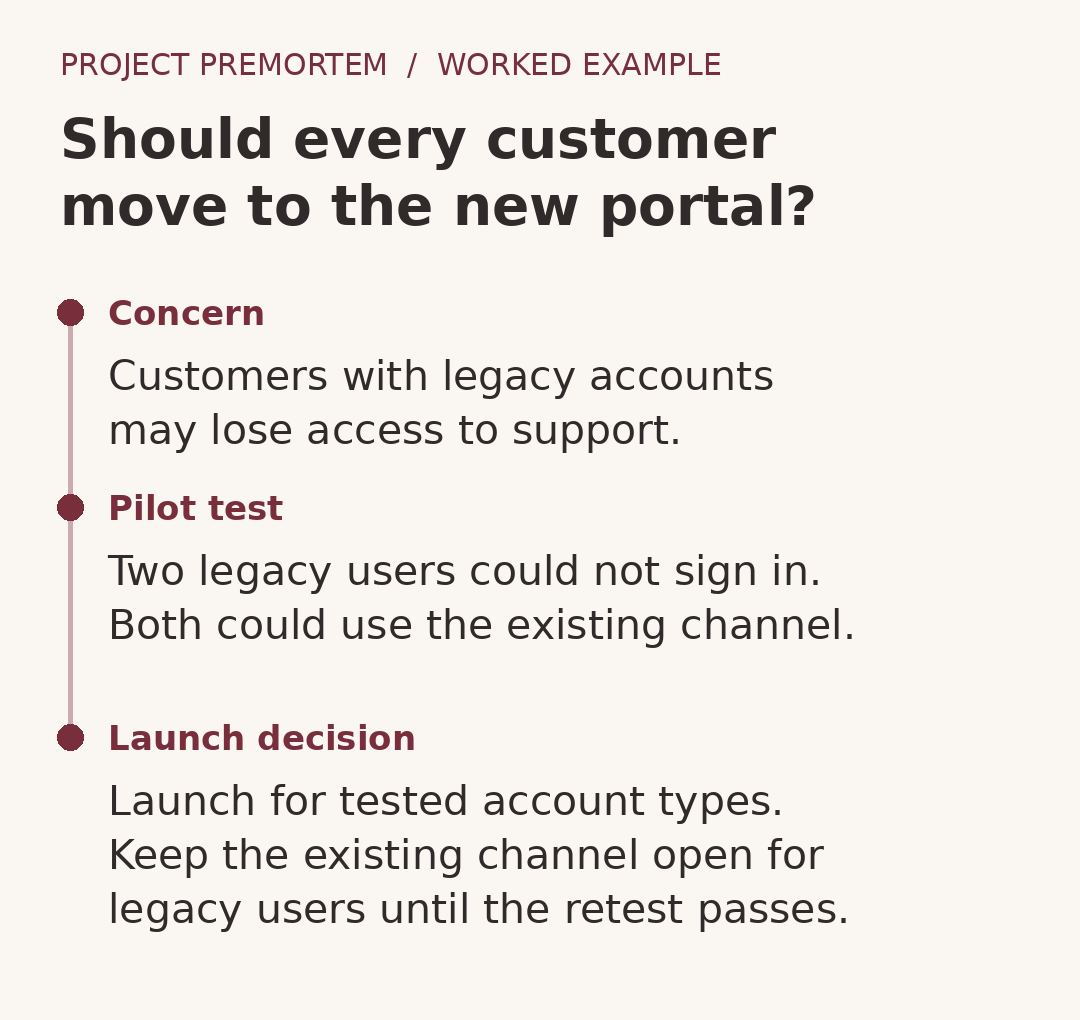
Decision taken and reason. The sponsor approves the rollout for the account types that passed testing. Routing and ticket reconciliation worked, but the failed sign-ins justify a separate decision for legacy accounts. The identity lead will fix sign-in and retest with both affected users on December 7 before asking the sponsor to expand access.
How to use the template before a project decision
- Name the commitment. Write the question the decision owner can answer. “Move all customers on Friday?” leaves room to change the date or the group included.
- Imagine a specific failure. Ask each participant to write plausible causes independently before comparing answers. Choose causes the team can investigate while there is still time to change the plan.
- Assign a check and a response. Give each check one owner and a review date before approval. Agree who has authority to delay, narrow, or approve the rollout if the trigger is met.
- Bring the evidence back. Record the observation alongside the original concern. If a test is incomplete, mark it as pending and ask the decision owner how to handle the uncertainty.
For facilitation prompts and a 60-minute session agenda, see how to run a premortem workshop.
What to review at the go/no-go meeting
Start with the findings that could change the commitment. For each one, ask: What did the owner observe? Did it meet the trigger? Which customers, teams, or dates does that affect? In the portal example, two failed sign-ins were enough to narrow the rollout even though the other checks passed.
Close the meeting by reading the decision back to the owners. Record who can proceed, who still needs the fallback, and what evidence would justify expanding the rollout. The next reviewer should be able to act from that entry without reconstructing the discussion.